How to Compare, Pair, and Preview Fonts Fast
Choosing a font should feel exciting, not exhausting. But for most designers, typography decisions turn into a major time sink: endless browser tabs, inconsistent previews, confusing licenses, and the classic problem of “this looked good in the list but terrible in the design.”
Choosing a font should feel exciting, not exhausting. But for most designers, typography decisions turn into a major time sink: endless browser tabs, inconsistent previews, confusing licenses, and the classic problem of “this looked good in the list but terrible in the design.”
FindFont.co is built to fix that. It offers a streamlined typography workflow that lets you compare fonts side-by-side, generate clean pairings, and preview them instantly in real layouts all in one place.
If you’re working on branding, websites, UI design, or client work, this guide will show you how to choose fonts quicker and get better results.
Why Font Decisions Usually Take So Long
Font selection often breaks down for four specific reasons:
Lack of Comparison: You can’t see fonts side-by-side with the same text and sizing.
The Pairing Struggle: Guessing if a headline works with a body font often leads to visual clutter.
Poor Context: Previews rarely reflect real design usage (hierarchy, layout roles, UI elements).
Local Assets: You can’t confidently test with your own brand assets or local font files.
FindFont.co solves these friction points with a workflow that mirrors how professional designers actually work.
The FindFont.co Workflow: Compare, Pair, Mockup
A strong typography workflow isn't just about browsing; it's about validating. Here is how to use the platform to go from "searching" to "shipping" in minutes.
1. The Font Comparison Tool: Stop Guessing
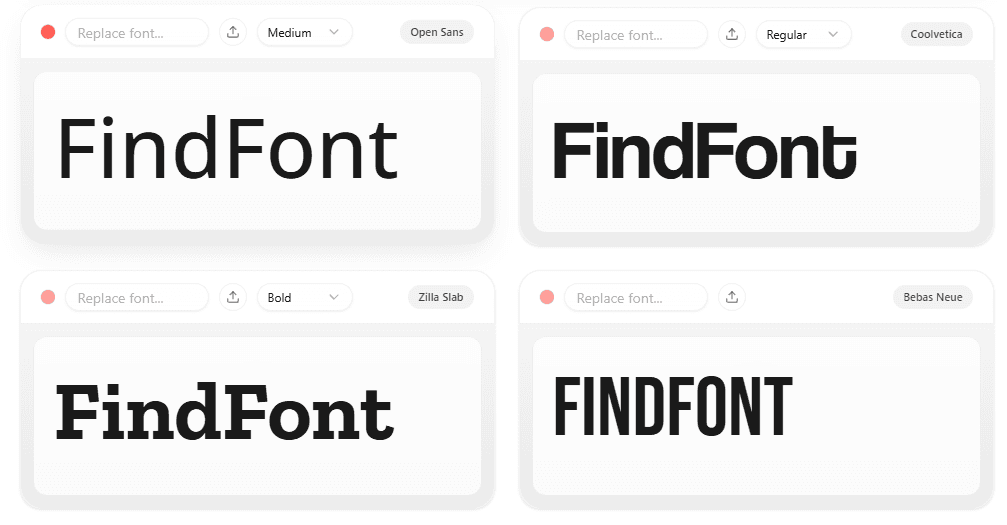
When you compare fonts one by one across different tabs, your brain relies on memory—and memory is unreliable. The Font Comparison Tool lets you evaluate multiple typefaces simultaneously using:
Your own text: Test with your specific brand name, headlines, CTAs, or UI labels.
Real sizing: Adjust weights and sizes to see how the font renders at 12px vs 72px.
Clean layouts: Instant side-by-side results without jumping between pages.
Pro Tip: Don’t test fonts with generic "Lorem Ipsum" or "The Quick Brown Fox." Use a real product description or a button label like “Get Started.” You’ll instantly see which font fits the character of your brand.
2. The Font Pairing Tool: Generate Smart Combinations
A font can be perfect alone… and terrible in a pair. Most pairing issues arise from conflicting personalities or awkward x-height differences.
The Font Pairing Tool makes this process logical rather than random. It provides:
Visual Hierarchy: See H1, H2, paragraph, and UI text together.
Contextual Layouts: Previews that feel like a real website or product page.
Contrast Control: Ensure your body font supports the headline without competing with it.
Best For: Designers building a typography system for a product, landing page, or "premium" brand look.
3. The 3D Mockup Generator: Validate in Context
Sometimes a font looks perfect in a tool but feels wrong in the final product. The 3D Mockup Generator allows you to bridge that gap immediately.
Real Mockups: Preview typography on physical objects or digital screens.
Local File Support: Drag and drop your own local fonts (custom, bought, or work-in-progress) to test them securely.
Client-Ready Exports: Create clean visuals for approvals or social media.
The 10-Minute Font System
Stop spending hours scrolling. Use this clean 4-step workflow to make decisions fast:
Shortlist: Browse the Font Directory by style or vibe and save your top 10 choices.
Compare: Use the Comparison Tool to eliminate the weak options and reach your "Final 3."
Pair: Use the Pairing Tool to find the perfect supporting body font.
Mockup: Validate the final choice on a 3D asset to ensure it works in the real world.
Who is FindFont.co Built For?
UI/UX Designers: Building scalable, clean typography systems.
Brand Designers: Making critical logo and web font decisions.
Founders: Who need their product to look premium without hiring an agency.
Creators: Designing visuals, posters, and social assets.
Typography is one of the highest-leverage design decisions you can make. FindFont.co just makes it easier.
Frequently Asked Questions
Is FindFont.co free to use? Yes. FindFont.co includes free tools specifically built to help designers work faster.
Can I preview fonts using my own text? Absolutely. Comparing with real copy (your brand name or headlines) is the best way to make confident decisions.
Does it support local font uploads? Yes. The mockup generator supports drag-and-drop local font previews, so you can test fonts you have purchased or are currently designing.
How is this different from other font sites? Most font sites help you browse. FindFont.co helps you decide.