12 Best Free Alternatives to Segoe UI in 2026
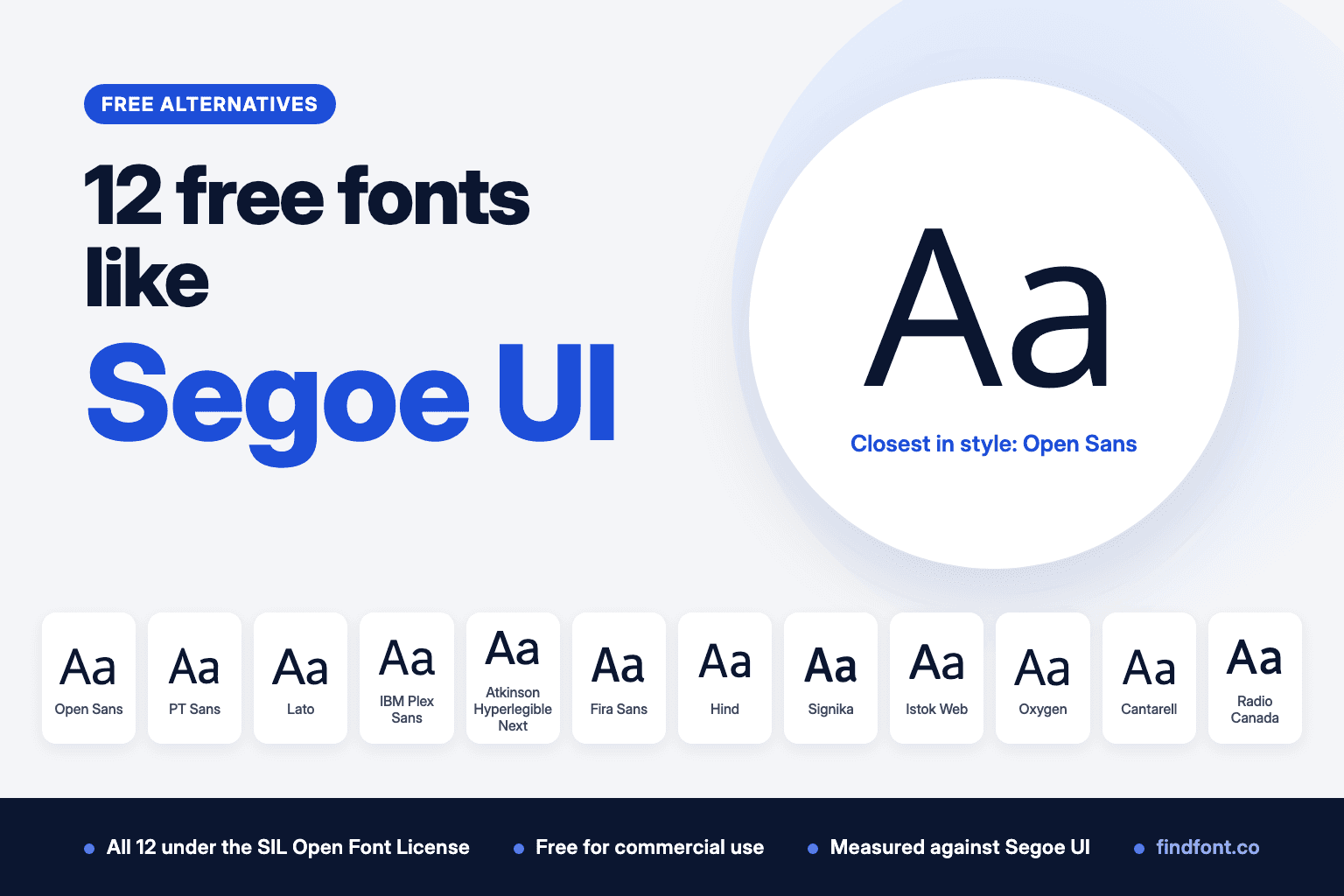
Segoe UI comes with Windows, but you can't host it on your own site. We measured 12 free OFL fonts against it. Open Sans, PT Sans and Lato are the best picks.
Segoe UI became Microsoft's default interface font with Windows Vista in 2007 (Microsoft). Windows and Microsoft Office still ship it.
Segoe UI grew out of Segoe, a typeface Microsoft credits to the type designer Steve Matteson. Microsoft's lead fonts program manager at the time explained that Segoe was an existing Monotype design that Microsoft licensed and then extended (Microsoft blog archive). Microsoft's design guidelines describe Segoe UI as a humanist sans serif tuned for ClearType, its screen text rendering (Microsoft).
Using it outside Windows is where it gets tricky. Microsoft lists no download for Segoe UI and says it is only included with Microsoft products. Its font FAQ forbids copying Windows fonts to a web server or converting them to WOFF or WOFF2 (Microsoft font FAQ). Segoe UI can be licensed from Monotype, and MyFonts sells it, but Segoe UI Variable, the newer Windows 11 system font, can't be licensed for use outside Microsoft products at all.
So a Mac or Android user visiting your site won't see Segoe UI unless you've paid for a web licence. A free font that shares its open, calm, humanist style solves that.
We picked 12 free fonts from the findfont catalogue, all under the SIL Open Font License, and measured each one against Segoe UI's x-height and text width. The numbers are in "Which free font is closest to Segoe UI?" below.
1. Open Sans
Best overall free alternative to Segoe UI
Open Sans and Segoe have the same designer. Google's description credits Open Sans to Steve Matteson, then Type Director at Ascender, and calls it a humanist sans serif with upright stress, open forms and a neutral, friendly look. That is very close to how Microsoft describes Segoe UI.
The difference is size. Open Sans has a taller x-height, 7% taller than Segoe UI's in our measurement, so it looks bigger at the same font size. Open Sans at 15px has about the same x-height as Segoe UI at 16px. Once you match the size that way, text runs 2% shorter than in Segoe UI.
Its Google Fonts description lists Latin, Greek, Cyrillic and Hebrew support.
Use Open Sans for
- Website and app body text
- Interfaces that should feel at home next to Windows
- Help centres and documentation
- Multilingual products
Open Sans is licensed under the SIL Open Font License 1.1. Preview and download Open Sans.
Verdict. Open Sans is the closest in spirit to Segoe UI. Set it about one pixel smaller and most people won't notice the switch.
2. PT Sans
Closest x-height to Segoe UI
ParaType released PT Sans in 2009 for the Public Types of Russian Federation project. Its description says it is based on Russian sans serifs from the second half of the twentieth century, with features of contemporary humanist designs.
In our measurements PT Sans matched Segoe UI's x-height exactly, and the test sentence ran 2.9% shorter. If you're replacing Segoe UI in a layout that has to stay the same size, PT Sans is the least disruptive choice.
The limit is the family. On findfont, PT Sans comes in Regular and Bold with italics, with no light or semibold weights. Segoe UI on Windows has more weights than that.
Use PT Sans for
- Body text that replaces Segoe UI one for one
- Cyrillic and Latin content
- Documentation
- Simple interfaces with two weights
PT Sans is licensed under the SIL Open Font License 1.1. Preview and download PT Sans.
Verdict. PT Sans is the best size match, as long as two weights are enough.
3. Lato
Best warm, friendly Segoe UI alternative
Łukasz Dziedzic started Lato in 2010. Its description talks about classical proportions, semi-rounded details that feel warm and a structure that stays serious.
Lato's lowercase is very close to Segoe UI's. The x-height measured 1.3% taller and the lowercase alphabet set to the same width. The capitals are wider, 8% across the uppercase alphabet, so headings in caps will look broader.
On findfont Lato comes in weights from Thin to Black with italics, which covers more of Segoe UI's range than PT Sans does.
Use Lato for
- Corporate websites
- Presentations and reports
- Education and nonprofit sites
- Friendly product interfaces
Lato is licensed under the SIL Open Font License 1.1. Preview and download Lato.
Verdict. Lato gives you Segoe UI's lowercase rhythm with a warmer finish.
4. IBM Plex Sans
Best for product and enterprise interfaces
Mike Abbink designed IBM Plex with the Dutch foundry Bold Monday. Its description calls the result a neutral, yet friendly grotesque with good legibility in print, web and mobile interfaces.
Plex isn't humanist like Segoe UI. Its letters are more engineered. But it measured very close on width, 0.2% longer on the test sentence, with an x-height 3.2% taller.
Plex suits enterprise software, developer tools and dashboards, where Segoe UI's job is to be clear and stay out of the way.
Use IBM Plex Sans for
- Enterprise software
- Developer tools
- Dashboards
- Technical documentation
IBM Plex Sans is licensed under the SIL Open Font License 1.1. Preview and download IBM Plex Sans.
Verdict. IBM Plex Sans is a good fit when a product needs Segoe UI's clarity with a more technical voice.
5. Atkinson Hyperlegible Next
Best for accessibility
The Braille Institute developed Atkinson Hyperlegible to help readers with low vision. Atkinson Hyperlegible Next is the refined version, with new weights, better kerning and wider language support. It starts from a traditional grotesque and adds distinctive letter shapes so similar characters are harder to confuse.
It also came out closest to Segoe UI on overall size. The x-height was 0.8% shorter and the test sentence 1.1% shorter.
The distinctive letters are the point of this font, so it won't pass as Segoe UI. It's the right choice when legibility for every reader matters more than a familiar look.
Use Atkinson Hyperlegible Next for
- Public services and healthcare
- Accessible interfaces
- Forms and instructions
- Education
Atkinson Hyperlegible Next is licensed under the SIL Open Font License 1.1. Preview and download Atkinson Hyperlegible Next.
Verdict. Choose it when accessibility is the main requirement.
6. Fira Sans
Best for another operating system's interface style
Fira was designed for Mozilla's Firefox OS, a phone operating system, and the Berlin foundry Carrois built it to stay legible across handsets with very different screens. Like Segoe UI, then, it was made to be a system font.
Fira Sans comes in three widths with italics, plus a monospaced companion. On findfont the regular width runs from Thin to Black.
It measured 5.4% taller than Segoe UI at x-height and 2.1% longer on the test sentence.
Use Fira Sans for
- Mobile app interfaces
- Small screens
- Technical products with code
- Design systems that need several widths
Fira Sans is licensed under the SIL Open Font License 1.1. Preview and download Fira Sans.
Verdict. Fira Sans has the same job description as Segoe UI, for a different platform.
7. Hind
Best for clean interface labels
Indian Type Foundry developed Hind explicitly for user interface design. It has humanist construction, nearly monolinear strokes, open apertures and flat stroke endings, which keep the spaces inside and between letters clear.
Hind measured 1.6% taller than Segoe UI at x-height and 3.1% shorter on the test sentence. On findfont it comes in five weights, without italics.
It also supports Devanagari, which makes it useful for products that serve Hindi and Marathi readers alongside English.
Use Hind for
- Buttons, menus and labels
- Devanagari and Latin interfaces
- Mobile apps
- Dashboards
Hind is licensed under the SIL Open Font License 1.1. Preview and download Hind.
Verdict. Hind is a tidy interface font, but plan around the missing italics.
8. Signika
Best compact Segoe UI alternative
Anna Giedryś designed Signika for wayfinding, signage and other places where information must be clear at small sizes and long distances. It has low contrast and a tall x-height, and its description names Ronnia, Meta and Microsoft's Tahoma as influences.
Its x-height matched Segoe UI's within half a percent, but it sets narrower. The test sentence ran 5.5% shorter. That makes Signika useful where space is tight, such as sidebars, tables and mobile layouts.
Its figures are tabular, so numbers line up in columns.
Use Signika for
- Tight layouts and sidebars
- Tables and numeric data
- Signage and wayfinding
- Mobile screens
Signika is licensed under the SIL Open Font License 1.1. Preview and download Signika.
Verdict. Signika is the pick when you need Segoe UI's size in less space.
9. Istok Web
Best lesser-known alternative
Andrey Panov has developed Istok since 2008. He drew it in the free font editor FontForge and hand-hinted most of its glyphs for LCD screens.
That screen focus shows in the measurements. Istok Web was 2.5% taller than Segoe UI at x-height and 1.2% longer on the test sentence, so it fits Segoe UI layouts with little change.
On findfont Istok Web has Regular and Bold with italics. It's a solid, unfussy text face that few sites use, which is a small advantage if you don't want to look like everyone else.
Use Istok Web for
- Body text on websites
- Blogs and documentation
- Cyrillic and Latin content
- Simple interfaces
Istok Web is licensed under the SIL Open Font License 1.1. Preview and download Istok Web.
Verdict. A quiet, well-fitted alternative for text that just needs to read well.
10. Oxygen
Best for a desktop-software feel
Oxygen was made for the KDE Project, a free desktop for Linux. Its description says it was optimised for the FreeType rendering system and works well in graphical user interfaces. Like Segoe UI, it was made to be the font of a desktop.
It looks larger than Segoe UI. The x-height measured 7.1% taller, while the test sentence ran only 0.5% longer, so the letters are big and fairly tightly fitted.
Findfont has Oxygen in Light, Regular and Bold, with no italics.
Use Oxygen for
- Desktop and web app interfaces
- Open-source projects
- Toolbars and settings screens
- Short interface text
Oxygen is licensed under the SIL Open Font License 1.1. Preview and download Oxygen.
Verdict. Oxygen suits software interfaces, as long as you don't need italics.
11. Cantarell
Best for long reading on screen
Dave Crossland designed Cantarell in 2009 during his MA in Typeface Design at the University of Reading. It is a contemporary humanist sans serif made for on-screen reading, originally web pages on an HTC Dream phone.
Cantarell measured 3.5% shorter than Segoe UI at x-height and 4% wider on the test sentence. That extra width gives paragraphs an open, relaxed feel.
On findfont it has Regular and Bold, with italics. That is enough for articles and blog posts, but thin for a full interface.
Use Cantarell for
- Articles and blog posts
- Reading apps
- Documentation
- Open-source project sites
Cantarell is licensed under the SIL Open Font License 1.1. Preview and download Cantarell.
Verdict. Use Cantarell for reading, not for dense interfaces.
12. Radio Canada
Best for media and public organisations
Charles Daoud created Radio-Canada's font in 2017 as the information typeface for every CBC/Radio-Canada platform. Its description calls the style humanistic, with distinctive angles and subtle curves, and says its x-height was chosen for legibility and digital accessibility.
Radio Canada measured 3% taller than Segoe UI at x-height and 3.4% longer on the test sentence. When we matched the two by x-height, the line lengths were within half a percent.
Use Radio Canada for
- News and media sites
- Public organisations
- Accessible interfaces
- Editorial apps
Radio Canada is licensed under the SIL Open Font License 1.1. Preview and download Radio Canada.
Verdict. Radio Canada is a good choice for organisations that publish a lot of information to a wide audience.
Which free font is closest to Segoe UI?
There is no free copy of Segoe UI on findfont, so pick by what you need to keep.
For the closest style, choose Open Sans, from the same designer as Segoe.
For the closest size, choose PT Sans.
For Segoe UI's exact line lengths, consider Selawik, with the gaps described below.
For a warm, complete family, choose Lato.
For product interfaces, choose IBM Plex Sans.
For accessibility, choose Atkinson Hyperlegible Next.
For tight spaces, choose Signika.
Our measurements
We measured the Regular weight of each font against Segoe UI Regular, version 5.67, the copy Microsoft 365 installs. Variable fonts were set to weight 400 with every other axis at its default. We compared the height of the lowercase x and the width of the sentence "The quick brown fox jumps over the lazy dog" at the same font size. The last column compares width again after scaling each font to Segoe UI's x-height, which shows how text length changes once you resize the replacement to look the same size.
| Font | x-height vs Segoe UI | Same sentence, same size | Same sentence, x-height matched |
|---|---|---|---|
| Selawik | -4.9% | 0.0% | +5.1% |
| Atkinson Hyperlegible Next | -0.8% | -1.1% | -0.3% |
| Lato | +1.3% | -0.6% | -1.9% |
| PT Sans | 0.0% | -2.9% | -2.9% |
| IBM Plex Sans | +3.2% | +0.2% | -2.9% |
| Istok Web | +2.5% | +1.2% | -1.3% |
| Hind | +1.6% | -3.1% | -4.6% |
| Radio Canada | +3.0% | +3.4% | +0.4% |
| Signika | +0.4% | -5.5% | -5.9% |
| Fira Sans | +5.4% | +2.1% | -3.1% |
| Cantarell | -3.5% | +4.0% | +7.8% |
| Oxygen | +7.1% | +0.5% | -6.2% |
| Open Sans | +7.0% | +4.8% | -2.1% |
Measured on 18 October 2026.
None of the 12 fonts above is metrically compatible with Segoe UI, so expect some lines to break in different places. Selawik is the exception.
What about Selawik?
Microsoft's free fallback for Segoe UI, with gaps
Microsoft has its own free font for this job. Its repository calls Selawik "an open source replacement for Segoe UI", and it is licensed under the SIL Open Font License 1.1 (Selawik on GitHub).
Its widths are the point. In our measurements, every printable ASCII character in the Regular and Bold weights had exactly Segoe UI's width, and the test sentence set to the same length. That makes Selawik a fallback that keeps Segoe UI's line lengths:
font-family: "Segoe UI", Selawik, sans-serif;
It has real gaps, though.
- It has no kerning. Microsoft lists kerning as an open issue. Browsers usually kern text, and in our test a line full of pairs like AV and To set about 4% longer in Selawik than in Segoe UI.
- Microsoft says its hinting needs improvement. Hinting matters most for small text on Windows.
- It covers Latin only. There's no Greek or Cyrillic, and a few Latin-1 characters are missing, including the no-break space.
- Its x-height measured 4.9% shorter than Segoe UI's, so it looks a little smaller at the same size.
- It has five weights, Light to Bold, and no italics. The download has all five, and findfont previews four. The latest release, 1.01, is from December 2015.
Selawik is licensed under the SIL Open Font License 1.1. Preview and download Selawik.
Verdict. Use Selawik when keeping Segoe UI's line lengths matters more than polish. For text that has to look good everywhere, the 12 fonts above are better finished.
Using Segoe UI on a website, legally
You don't have to choose between Segoe UI and a free font. You can use both.
Microsoft's FAQ says web publishers are free to name Windows fonts in their CSS font stacks, because the font is used on the visitor's own Windows device (Microsoft font FAQ). Bootstrap's "native font stack" does this, listing Segoe UI for Windows (Bootstrap).
What you can't do is serve Segoe UI's files from your server. So put a free font right after it:
font-family: "Segoe UI", "Open Sans", sans-serif;
Windows visitors see their own Segoe UI. Everyone else sees Open Sans, which you can self-host because its licence allows it. Pick a fallback with a similar size, or set its size with care, so the page doesn't jump between platforms. The measurement table above helps with that.
Microsoft's Windows 11 guidance says Segoe UI Variable is now the Windows system font, and that web pages have to name it in CSS to use it (Microsoft). The same rules apply, and Segoe UI Variable can't be licensed for other platforms at all.
Can these fonts be used commercially?
Yes. Every font in this list is published on findfont under the SIL Open Font License 1.1. The licence says fonts can be "used, studied, modified and redistributed freely as long as they are not sold by themselves" (OFL).
That covers websites, apps, logos, ads and client work, and it lets you self-host the files and bundle them in software. Two limits apply:
- You can't sell the font files on their own.
- If you modify a font that has a Reserved Font Name, your version needs a new name.
Segoe UI works differently. You can use it on Windows, name it in CSS, and make images with it, which Microsoft treats like printing. You can't copy it to a web server, convert it to a web font or redistribute it. A web or app licence for Segoe UI is sold through Monotype's MyFonts.
Always check the licence file that comes with any font you download.
How to choose the right Segoe UI alternative
Look at the lowercase
Segoe UI's personality is in its open, round lowercase letters. Compare a, e, g and s at your body text size, not in a headline.
Match the size first
Open Sans, Oxygen and Fira Sans all look bigger than Segoe UI at the same size. Drop them by about a pixel before you compare.
Count the weights you use
Segoe UI on Windows has many weights. PT Sans, Istok Web and Cantarell have only Regular and Bold on findfont, and Hind and Oxygen have no italics. Check what your design uses before you switch.
Test on Windows and on a Mac
If you use Segoe UI in a font stack, your fallback is what Mac, iPhone and Android visitors see. Look at the page on both before you ship.
Compare side by side
Type your own interface text into the findfont compare tool. That link opens six of the fonts above. You can compare up to 10 at once.
Final recommendation
Open Sans is the best free alternative to Segoe UI for most projects. It comes from the same designer, it shares the humanist style and it works on every platform.
Choose PT Sans when the size has to match exactly, Lato for a warmer complete family, IBM Plex Sans for product interfaces and Atkinson Hyperlegible Next when accessibility comes first.
On the web, you can have both. Name Segoe UI first for Windows visitors and serve one of these as the fallback for everyone else.
If you're also replacing Apple's system font, see our guide to free alternatives to SF Pro.
Frequently asked questions
Is Segoe UI free?
Segoe UI comes with Windows and some Microsoft products at no extra cost, but it isn't free to distribute. Microsoft offers no download, and its font FAQ forbids copying Windows fonts to a web server or converting them to web font formats. You can buy a web or app licence through Monotype's MyFonts store.
Can I use Segoe UI on my website?
You can name it in your CSS so Windows visitors see their installed copy. You can't host the font files yourself without a licence. Add a free fallback such as Open Sans for visitors on other systems.
What Google font is closest to Segoe UI?
Open Sans is closest in style and comes from Steve Matteson, the designer Microsoft credits for Segoe. PT Sans and Lato were closest in size in our measurements.
Who designed Segoe UI?
Microsoft credits Steve Matteson with Segoe, the typeface Segoe UI is based on. Microsoft licensed the original design from Agfa Monotype and extended it.
What font does Windows 11 use?
Windows 11 uses Segoe UI Variable as its system font. Segoe UI still ships with Windows 11 too.
Is there a free version of Segoe UI Variable?
No. Microsoft says Segoe UI Variable isn't available for use outside Microsoft products or on other platforms.
More free font alternatives
- Free alternatives to Arial
- Free alternatives to Aptos
- Free alternatives to Gotham
- Free fonts similar to Helvetica
- Free alternatives to Avenir
- Free fonts similar to SF Pro
Sources
- Microsoft Learn, Segoe UI font family. Windows Vista in 2007, Segoe credited to Steve Matteson, download listed as not available.
- Microsoft blog archive, I guess no one cares about fonts, 2005, quoting Simon Daniels on licensing Segoe from Monotype.
- Microsoft Learn, Fonts, Windows user experience guidelines. Humanist sans serif, optimised for ClearType.
- Microsoft Learn, Font redistribution FAQ for Windows. CSS font stacks, web server and WOFF restrictions, Monotype licensing, Segoe UI Variable.
- Microsoft Learn, Typography in Windows. Segoe UI Variable as the Windows system font.
- MyFonts, Segoe UI.
- Bootstrap, Reboot: native font stack.
- SIL, Open Font License official text.
- Free font descriptions: each family's description file in the google/fonts repository.
- Selawik on GitHub, Microsoft. "Open source replacement for Segoe UI", open issues with kerning and hinting, release 1.01.
- Measurements: findfont, 18 October 2026, using fontTools on the font files described above. The Selawik kerning check used HarfBuzz.